10 restaurant and pizzeria flyer ideas: what to write and how to show it
The flyers that work best carry one clear offer: a takeaway menu, a meal deal, a voucher with a code, a loyalty card, delivery details or office lunches. Print them mostly in DL (99×210 mm) or A5 (148×210 mm) on 130–170 g/m² silk or gloss paper, from a 300 DPI CMYK file with 3 mm bleed. Your phone number and prices should be at least 14–16 pt, and body text 9–11 pt.
A restaurant or pizzeria flyer lands in the letterbox, on the doormat or in a takeaway box alongside several others. You have a few seconds for the customer to see the dish, the price and the phone number. Below are 10 proven flyer ideas, each with tips on what to write, how to show it and how to prepare the file so the printer doesn't send it back for corrections.
Where should you start when designing a restaurant flyer?
Before you pick an idea, decide on one goal for the flyer: more delivery orders, more footfall at lunchtime, regulars coming back or winning over local businesses. A flyer that tries to do everything at once usually does nothing well. One main offer, one photo and one call to action is a safe starting point.
Think too about where the flyer will end up. A pizza box insert for a customer who already knows you is designed differently from a letterbox drop on a new estate where nobody has heard of you yet. The distribution method determines the format, paper weight and amount of text.
- Goal: an order, a visit, a returning customer or a contract with a business
- Audience: local residents, office workers, students, families
- Where: letterboxes, the counter, takeaway boxes, office reception desks
- Measuring results: a discount code, a tear-off voucher or a QR code
10 restaurant and pizzeria flyer ideas
You can print each of these ideas on its own or combine two on the front and back, for example a takeaway menu with a voucher. Choose the ones that suit your venue and opening hours.
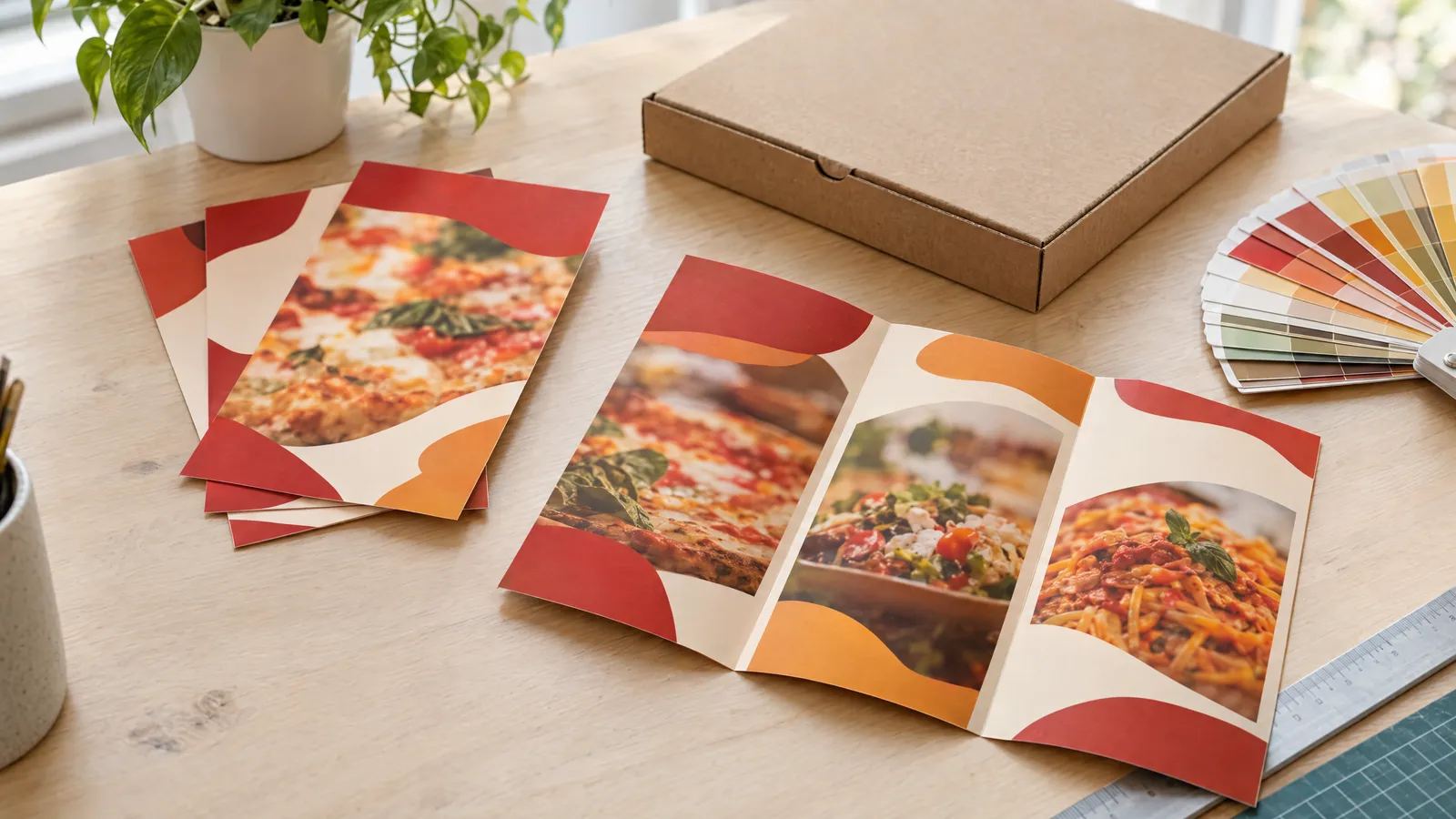
- Takeaway menu: pick the 15–30 most frequently ordered items with prices and split them into categories (pizza, pasta, salads, drinks). DL or A4 folded to DL works well, as customers keep it by the fridge.
- Meal deal of the day or week: show one deal in a large photo, e.g. soup + main course + drink, with the price and the hours it's available. A day-by-day breakdown helps customers plan their lunches.
- Discount voucher: add a tear-off or cut-out slip at the bottom of the flyer with the amount or percentage off and the terms. A dashed cut line with a scissors symbol makes it obvious what to do.
- Loyalty card: on a business-card-sized 85×55 mm card, print e.g. 8–10 stamp boxes and a reward for a full card. Choose matt paper, as stamp ink can smudge on gloss.
- Delivery: make the phone number, delivery hours, minimum order value and delivery zones with charges stand out. A simple map or list of streets removes any doubt about whether you deliver to a given address.
- Office lunches: create a separate flyer for offices with a group-order offer, delivery time, VAT invoices and the contact details of the person in charge. Hand it out at reception desks in nearby office buildings.
- New dish or pizza of the month: one flyer, one dish, a large photo and a short description of the ingredients. This design works well when launching a seasonal menu.
- Happy hours: promote a discount at times when you're quiet, e.g. early afternoon on weekdays. Set the hours and days in large type to avoid any misunderstandings.
- Catering and parties: describe your offer for birthdays, communions and business events, with the number of guests, a sample menu and the price per head. A5 or folded A4 with more content works well here.
- Box insert: a small A6 flyer with a discount code for the next order or a nudge to leave an online review. It reaches a customer who is happy right now, so the chance of a repeat order is at its highest.
What should you write on a restaurant flyer?
People read a flyer in this order: headline, photo, price, contact details. The headline should name the benefit or offer, not just the name of the venue. Trim dish descriptions down to the ingredients customers actually choose on, and state the promotion's terms in a single sentence.
Always include an expiry date for the offer. Flyers circulate around homes for months, and an out-of-date price or discount is a recipe for arguments on the phone.
| Element | What to write | Tip |
|---|---|---|
| Headline | The offer or benefit, e.g. a lunch deal with its price | 3–7 words, the largest type on the page |
| Offer | Name of the dish or deal, ingredients, weight or size | Pizza size in cm, portion in g |
| Price | Price including VAT | Large, high-contrast, next to the photo |
| Terms | Expiry date, days, hours, exclusions | One sentence, min. 7–8 pt |
| Call to action | Call us, order online, scan the code | Just one, and unambiguous |
| Contact details | Phone, address, opening hours, website or QR code | Phone number min. 14–16 pt |
| Discount code | A unique code for this flyer | Lets you check how many orders it brought in |
How should you show food on a flyer?
A photo of the dish sells better than a description, but only if it's sharp, well lit and shows your real food. For print you need a photo at 300 DPI at its final size: across the full width of a DL (99 mm) that's about 1170 pixels, and across the width of an A5 (148 mm) about 1750 pixels. A phone photo is usually enough if you take it in daylight and without digital zoom.
Match the colours to the character of your venue: warm reds and oranges whet the appetite and suit a pizzeria, while dark backgrounds with gold or white suit a more upmarket restaurant. Leave white space around the key elements, because a cluttered flyer looks cheap and makes the price hard to find.
- One main photo instead of a dozen small ones
- Prices in one place in the column, aligned right
- No more than two typefaces: one for headings, one for body text
- Logo in a corner, not the centre, unless the flyer is meant to build awareness of a new venue
- QR code min. 20×20 mm with a white margin around it
Which format and paper should you choose for a flyer?
The format depends on how much content you have and how you'll distribute it. DL fits in a pocket, a letterbox and by the till; A5 gives room for a photo and a short menu; and A4 folded to DL makes a full takeaway menu. For letterbox drops, 130–170 g/m² silk or gloss is enough, but a flyer that needs to survive months by the fridge is worth printing on 250–350 g/m² or laminating with matt film.
| Format | Trimmed size | Best for |
|---|---|---|
| A6 | 105×148 mm | Box insert, voucher, short promotion |
| DL | 99×210 mm | Takeaway menu, meal deal, delivery |
| A5 | 148×210 mm | New dish, catering, offer with a large photo |
| A4 folded to DL | 210×297 mm (3 panels of approx. 99 mm) | Full takeaway menu |
| Business card | 85×55 mm or 90×50 mm | Loyalty card with stamps |
How do you prepare a flyer file for print?
The printer needs a PDF at the trimmed size plus 3 mm bleed on every side, in CMYK colour space and with images at 300 DPI. Keep important text, prices and the phone number at least 3–5 mm inside the trim line, because the guillotine blade can shift by a fraction of a millimetre. Convert text to outlines or embed the fonts in the PDF.
In a folded flyer, the panel that tucks inside is usually 1–3 mm narrower than the others; otherwise the paper buckles when folded. Agree the exact panel sizes with your printer before you start designing. If you don't have a designer, plakaty.shop lets you have a flyer designed via a simple form, and you'll receive a PDF with 3 mm bleed and a safe margin; the reverse side is an optional extra and matches the style of the front.
Whoever does the design, read every line of text, every price, the phone number and the address yourself before it goes to print. A typo in the phone number on several thousand flyers is the most expensive mistake in this business.
How do you distribute flyers and check whether they work?
Give each version of the flyer its own discount code, e.g. one for letterbox drops on the estate and another for office buildings. After a few weeks you'll be able to count which idea and which location brought in orders. Vouchers handed in at the till work just as well and don't need an online ordering system.
Letterbox drops are best done in the area you actually deliver to, and inserts should go into every order. Leave office flyers at reception in person with a quick chat, because an anonymous pile by the entrance rarely reaches the person who orders lunch for the team.
Checklist
- The flyer has one main offer and one call to action
- You have personally checked the prices, phone number, address and opening hours
- The promotion's expiry date is included
- PDF file in CMYK, 300 DPI, with 3 mm bleed
- Important content at least 3–5 mm inside the trim line
- Phone number and prices min. 14–16 pt, small print min. 7–8 pt
- QR code tested with a phone, min. 20×20 mm
- A separate discount code for each version of the flyer
- Paper weight suited to the use: 130–170 g/m² for letterbox drops, 250–350 g/m² for loyalty cards
FAQs
What is the best flyer format for a pizzeria?
DL (99×210 mm) is the most popular choice, as it fits a menu with prices and slips easily into letterboxes and pizza boxes. For a full menu, A4 folded to DL works well, while A6 is enough for a box insert.
What should go on a restaurant flyer?
A headline with the offer, a photo of the dish, the price, an expiry date, the phone number, address and opening hours. For delivery, add delivery zones and the minimum order value; for a promotion, add a discount code so you can measure how well it works.
What paper weight should I choose for a menu flyer?
For letterbox drops, 130–170 g/m² silk or gloss is enough. If the menu needs to last a long time by the fridge or in an office, choose 250–350 g/m² or matt lamination. Print loyalty cards on 300–350 g/m² paper with a matt finish.
Do I have to show prices on a restaurant flyer?
There's no general requirement to include prices on a promotional flyer, but a flyer with prices usually converts into orders more easily, as customers don't need to ring up and ask. If your prices change often, add an expiry date or use a QR code to link to your up-to-date online menu.
How do I add a voucher to a flyer?
Separate the voucher with a dashed line and a scissors symbol, and put the discount, terms, expiry date and a unique code on it. The voucher shouldn't contain information the customer needs once it's torn off, such as your only phone number.